TPLink LUA Decompilation

I’ve been doing some research into a Tplink Archer C60 V3 router recently. One of the first steps i take when looking at IOT devices is to get a copy of the firmware. One method is to dump the flash chip and recover it from that. The easier option, which is the case with the TPLink Archer C60 V3, is to just download the firmware from the internet. Many manufactures offer the firmware to download in order to update the device. I’m going to skip the process of extracting the firmware from the downloaded file, or dumping the flash memory with a programmer. I’m going to start from the point where you are looking at the devices file system and can see all its contents.
Background
The TPLink Archer C60 V3 is built on OpenWRT. You can tell this by looking for openwrt version and release files in /etc:
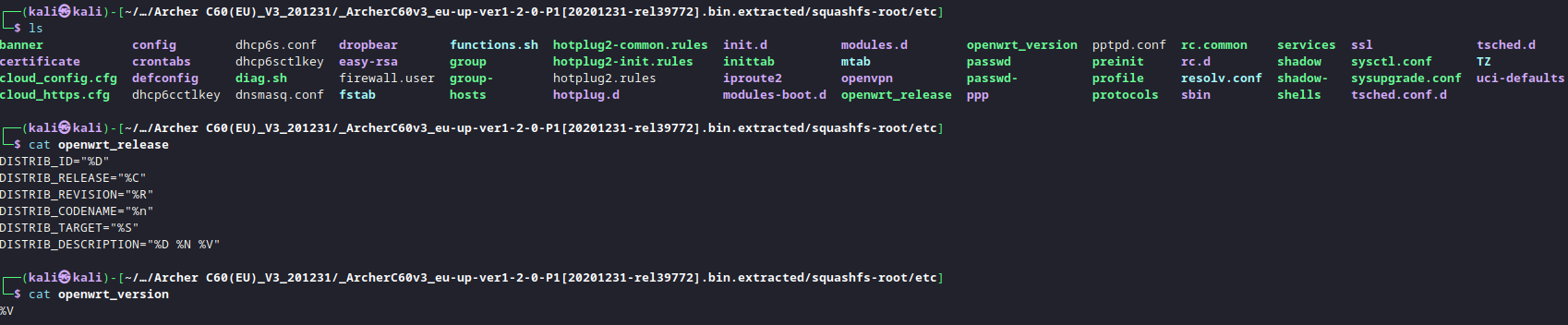
My first goal, and the aim of this post is to write about the lua implementation, and how the lua files on the device can be decompiled. The web interface for OpenWRT is based on a lua application called LUCI. The web application calls functions within various lua files on the device, which can then interact with the operating system. As you can imagine, its quite beneficial to understand how these LUA applications function in order to discover vulnerabilities. An example of some of these lua files can be seen below.

Typically, you have two types of lua files. Ones with the file extension .lua are the lua scripts. You can open these any a text editor and view the lua code. the other type are .luac files. These are compiled versions of the .lua file. If you open these in a text editor its far less readable. All you will see is lua byte-code. These luac files are the main focus for this post.
On the TPLink Arcer C60 V3. The .lua files are in fact compiled lua files, just with the .lua extension. If i open login.lua in a hex editor i get the following:
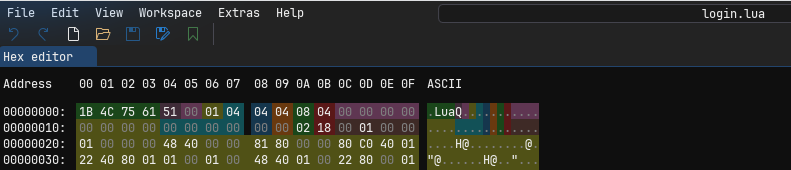
You can identify the file is a LUA bytecode file from the magic header. This is indicated by the first 4 bytes 1B4C7561. (Shown in green in the above screenshot.) The next value (51 in this case) indicates the LUA version 5.1. The meaning of the other values can be seen below:
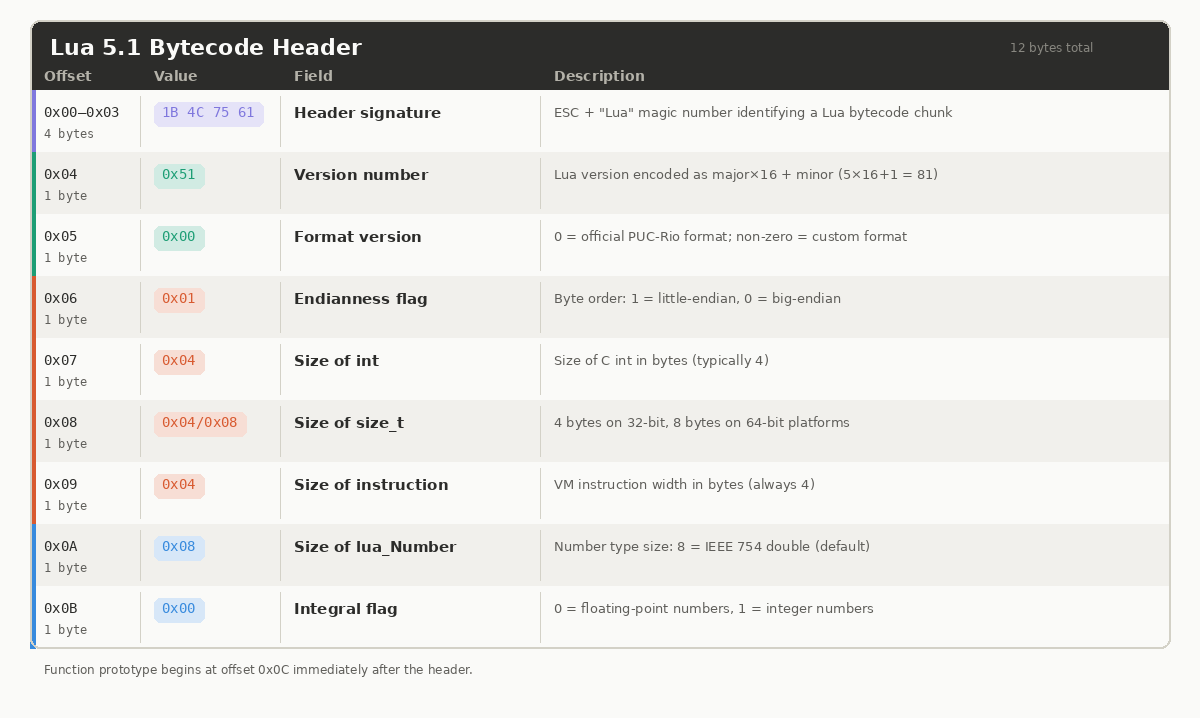
As you can see from the login.lua header, and the standard headers shown in the table above, all seem to abide by the LUA standard until you get to the last integral flag. The login.lua file has the intergral flag set to 0x04, however, the LUA standard states that it should be either 0x00 or 0x01 depending on if its a floating point number or integer. This is a big indication that TPLink haven’t compiled these LUA files using the standard LUA compiler, but instead used a custom modified compiler. This is the main hurdle we need to overcome.
If these LUA files were compiled using a standard LUA compiler. It would be possible to use something like unluac or luadec to decompile them. However, as they haven’t been compiled using the standard compiler, we get the following error.

You can see from the screenshot above that the 0x04 integral flag value is causing the decompilation to fail. If the 0x04 integral flag is manually changed in a hexeditor, and then decompiled again, we get the following:
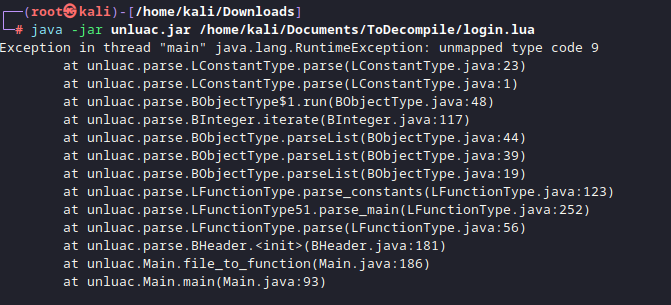
This error relates to an unmapped typecode. A typecode is an interger that identifies the type of value a lua variable holds at runtime. Standard lua 5.1 has 8 typecodes. The fact that there are 9 on this login.lua file means that TPLink have added an additional one to their LUA implementation. To decompile this custom version, you need to be able to specify a typecode mapping during compilation. This means, when the decompiler reaches this unknown typecode, it can lookup its value and continue with the decompilation, rather than crashing. To specify the typecode mapping, you need unluac, but not the standard version, you need a fork of it which has the –typemap option. This forked version is provided by viruscamp.
Download Unluac from viruscamp:
1
git clone https://github.com/viruscamp/unluac
Then compile it:
1
2
3
4
5
6
7
8
9
10
11
12
13
14
15
16
17
18
19
20
21
root@kali /opt/Firmware/unluac-new/unluac (master)# mkdir -p bin
root@kali /opt/Firmware/unluac-new/unluac (master)# ls
authors.txt  bin/  license.txt  src/  test/
root@kali /opt/Firmware/unluac-new/unluac (master)# javac -d bin @sources.txt
error: file not found: sources.txt
root@kali /opt/Firmware/unluac-new/unluac (master) [3]# find src -name "*.java" > sources.txt
root@kali /opt/Firmware/unluac-new/unluac (master)# javac -d bin @sources.txt
root@kali /opt/Firmware/unluac-new/unluac (master)# echo "Main-Class: unluac.Main" > MANIFEST.MF
root@kali /opt/Firmware/unluac-new/unluac (master)# jar cfm unluac_viruscamp.jar MANIFEST.MF -C bin .
root@kali /opt/Firmware/unluac-new/unluac (master)# java -jar unluac_viruscamp.jar --help
unluac v1.2.3.561
  usage: java -jar unluac.jar [options] <file>
Available options are:
  --assemble        assemble given disassembly listing
  --disassemble     disassemble instead of decompile
  --nodebug         ignore debugging information in input file
  --typemap <file>  use type mapping specified in <file>
  --opmap <file>    use opcode mapping specified in <file>
  --output <file>   output to <file> instead of stdout
  --rawstring       copy string bytes directly to output
  --luaj            emulate Luaj's permissive parser
You then need to generate a typemap.txt file.
Typemap file
This file tells unluac how to handle TPLinks custom type codes. In this case. A custom typecode of 9 was used. This isn’t standard and so a typemap.txt file is used to essentially say that a typecode of 9 maps to an interger.
1
2
3
4
5
6
root@kali /opt/Firmware/unluac-new/unluac (master)# cat typemap.txt
.type 0 nil
.type 1 boolean
.type 3 number
.type 4 string
.type 9 integer
Once this file is created, we re-run the decompiler:
1
2
3
4
5
6
  ┌──(root㉿kali)-[/home/kali/Documents/unluac]
  └─# java -jar unluac_viruscamp.jar --typemap typemap.txt /home/kali/Documents/ToDecompile/login.lua
  Exception in thread "main" unluac.decompile.DecompilerException: main 256: Function doesn't end with implicit return
          at unluac.decompile.Validator.process(Validator.java:16)
          at unluac.decompile.Decompiler.decompile(Decompiler.java:181)
          at unluac.Main.main(Main.java:98
From this, we can tell that there isn’t only custom typecodes, but also other customisation within TPLink’s lua implementation. The other common customisation that can be made is to the Opcodes. These are instructions for codes the LUA VM executes. The standard lua implementation has a set number of opcodes like MOVE, CALL, ADD, SUB, MOD etc. The decompliation of login.lua continues to fail because there are custom opcodes present in the lua file. We need another file, like we did with typemap.txt, where we can list the opcodes the custom lua implementation uses.
Opmap File
Opcodes in the TPLink version of lua are different to the standard LUA 5.1 implementation. Therefore, you need to create an opmap.txt file to list the custom opcodes in the correct order. To create the opmap file, You need to identify what opcodes are used within the LUA VM. The best way to do this is to use Ghidra to open/usr/bin/lua, within the extracted device firmware. This will list the opcodes used on the LUA virtual machine. They should be listed as strings called GETTABLE, NEWTABLE, CONCAR, LOADNIL, CALL, MOVE etc. They will be sequential and look like the following:
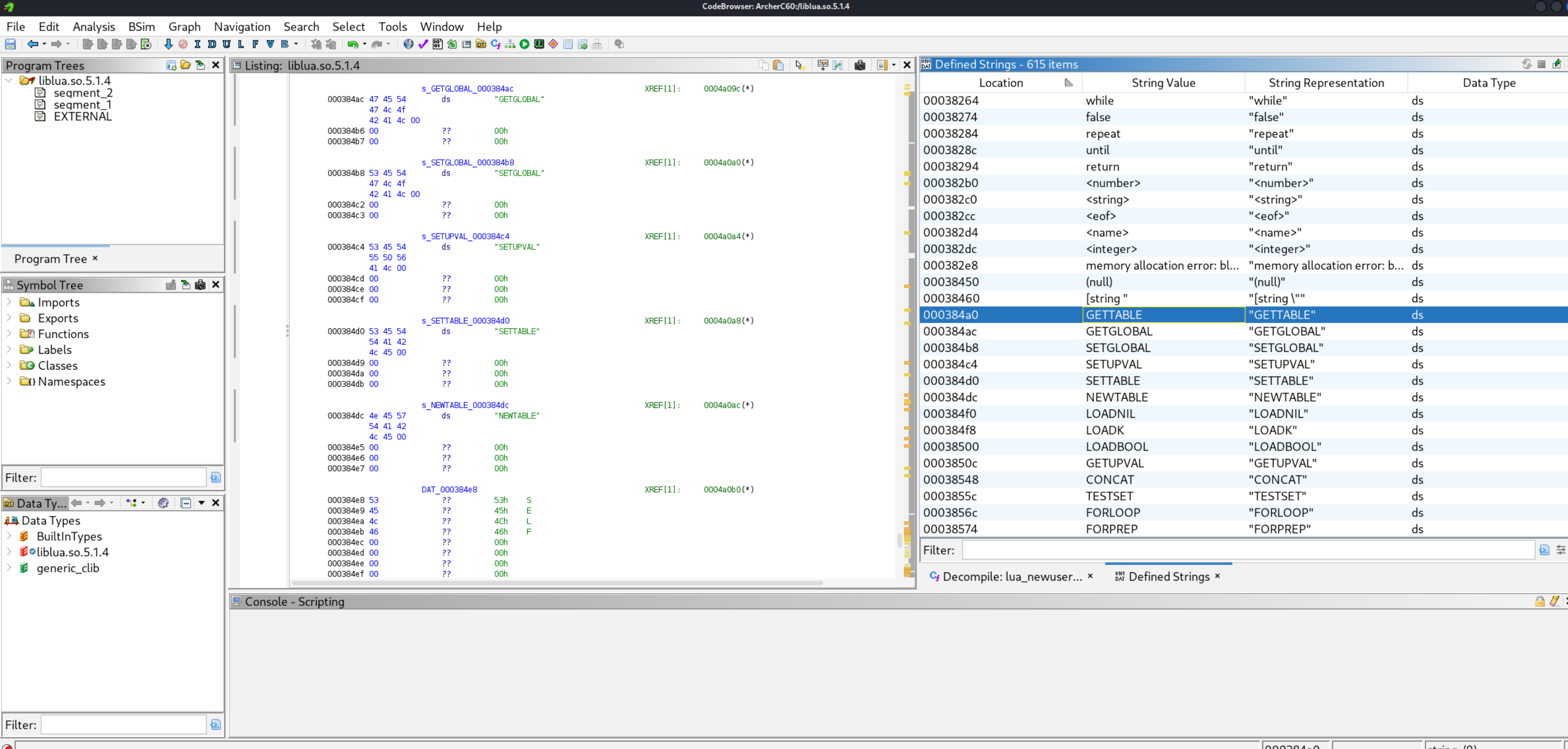
You can use the Window > Defined String view to see the strings listed. In the case of the Archer C60, the opcodes were not in /usr/bin/lua. You can see in the strings output it calls another library when run. (ld-uClibc.so.0) In this case, that file contained the opcodes i needed:

When you open the correct file with the opcodes, You need to go through this list and write out each opcode in order. Some of the shorter opcode names will be displayed vertically and longer ones horizontally like a string. Ignore this, just list all of them. You should then have a list like:
1
2
3
4
5
6
7
8
9
10
11
12
13
14
15
16
17
18
19
20
21
22
23
24
25
26
27
28
29
30
31
32
33
34
35
36
37
GETTABLE
GETGLOBAL
SETGLOBAL
SETUPVAL
SETTABLE
NEWTABLE
SELF
LOADNIL
LOADK
LOADBOOL
GETUPVAL
LT
LE
EQ
DIV
MUL
SUB
ADD
MOD
POW
UNM
NOT
LEN
CONCAT
JMP
TEST
TESTSET
MOVE
FORLOOP
FORPREP
TFORLOOP
SETLIST
CLOSE
CLOSURE
RETURN
TAILCALL
VARARG
Next, you need to map these opcodes with the standard opcode order in the normal LUA 5.1 configuration (Which unluac uses by default). You can find the standard opcode order for your specific version of lua in the opcodeMap.java file.
1
2
3
4
5
6
7
8
9
10
11
12
13
14
15
16
17
18
19
20
21
22
23
24
25
26
27
28
29
30
31
32
33
34
35
36
37
38
39
40
41
42
43
44
45
root@kali /opt/Firmware/unluac-new/unluac/src/unluac/parse (master)# cat /opt/Firmware/unluac/src/unluac/decompile/OpcodeMap.java
package unluac.decompile;

public class OpcodeMap {

  private Op[] map;

  public OpcodeMap(int version) {
    if(version == 0x50) {
      map = new Op[35];
      map[0] = Op.MOVE;
      map[1] = Op.LOADK;
      map[2] = Op.LOADBOOL;
      map[3] = Op.LOADNIL;
      map[4] = Op.GETUPVAL;
      map[5] = Op.GETGLOBAL;
      map[6] = Op.GETTABLE;
      map[7] = Op.SETGLOBAL;
      map[8] = Op.SETUPVAL;
      map[9] = Op.SETTABLE;
      map[10] = Op.NEWTABLE50;
      map[11] = Op.SELF;
      map[12] = Op.ADD;
      map[13] = Op.SUB;
      map[14] = Op.MUL;
      map[15] = Op.DIV;
      map[16] = Op.POW;
      map[17] = Op.UNM;
      map[18] = Op.NOT;
      map[19] = Op.CONCAT;
      map[20] = Op.JMP;
      map[21] = Op.EQ;
      map[22] = Op.LT;
      map[23] = Op.LE;
      map[24] = Op.TEST50;
      map[25] = Op.CALL;
      map[26] = Op.TAILCALL;
      map[27] = Op.RETURN;
      map[28] = Op.FORLOOP;
      map[29] = Op.TFORLOOP;
      map[30] = Op.TFORPREP;
      map[31] = Op.SETLIST50;
      map[32] = Op.SETLISTO;
      map[33] = Op.CLOSE;
      map[34] = Op.CLOSURE;
You need to map these opcodes with the ones gathered from Ghidra. For example. In my case, Ghidra showed move as 27th in the list (Starts at line 0) Therefore. My opmap.txt file im creating will have the line .op 27 move. gettable was my first opcode in ghidra, so ill have the line .op 0 gettable. etc. My final opcode.txt file looks like:
1
2
3
4
5
6
7
8
9
10
11
12
13
14
15
16
17
18
19
20
21
22
23
24
25
26
27
28
29
30
31
32
33
34
35
36
37
38
39
root@kali /opt/Firmware/unluac-new/unluac (master)# cat opmap.txt
.op 0 gettable
.op 1 getglobal
.op 2 setglobal
.op 3 setupval
.op 4 settable
.op 5 newtable
.op 6 self
.op 7 loadnil
.op 8 loadk
.op 9 loadbool
.op 10 getupval
.op 11 lt
.op 12 le
.op 13 eq
.op 14 div
.op 15 mul
.op 16 sub
.op 17 add
.op 18 mod
.op 19 pow
.op 20 unm
.op 21 not
.op 22 len
.op 23 concat
.op 24 jmp
.op 25 test
.op 26 testset
.op 27 move
.op 28 forloop
.op 29 forprep
.op 30 tforloop
.op 31 setlist
.op 32 close
.op 33 closure
.op 34 call
.op 35 return
.op 36 tailcall
.op 37 vararg
Decompliation
Once these opmap and typecode mapping files are created, you should be able to decompile the lua code.
1
2
3
4
5
6
7
8
9
10
11
12
13
14
15
16
17
18
19
20
21
22
23
24
25
26
27
28
29
30
root@kali /opt/Firmware/unluac-new/unluac (master) [1]# java -jar unluac_viruscamp.jar --typemap typemap.txt --opmap opmap.txt /home/kali/Documents/login.lua
local L0_1, L1_1, L2_1, L3_1, L4_1, L5_1, L6_1, L7_1, L8_1, L9_1, L10_1, L11_1, L12_1, L13_1, L14_1, L15_1, L16_1, L17_1, L18_1, L19_1, L20_1, L21_1, L22_1, L23_1
L0_1 = module
L1_1 = "luci.controller.login"
L2_1 = package
L2_1 = L2_1.seeall
L0_1(L1_1, L2_1)
L0_1 = require
L1_1 = "luci.model.controller"
L0_1 = L0_1(L1_1)
L1_1 = require
L2_1 = "nixio"
L1_1 = L1_1(L2_1)
L2_1 = require
L3_1 = "nixio.fs"
L2_1 = L2_1(L3_1)
L3_1 = require
L4_1 = "luci.sys"
L3_1 = L3_1(L4_1)
L4_1 = require
L5_1 = "luci.util"
L4_1 = L4_1(L5_1)
L5_1 = require
L6_1 = "luci.model.passwd_recovery"

.......

......

......
At this point, i’m in a position where all lua files on the device can be decompiled using the same typecode and opcode mapping files. The next step will be to analyse these decompiled files for vulnerabilities that can be exploited. But that’s for another day.